Link NinjaTrader 8 tabs across charts, DOMs, and most windows by color.
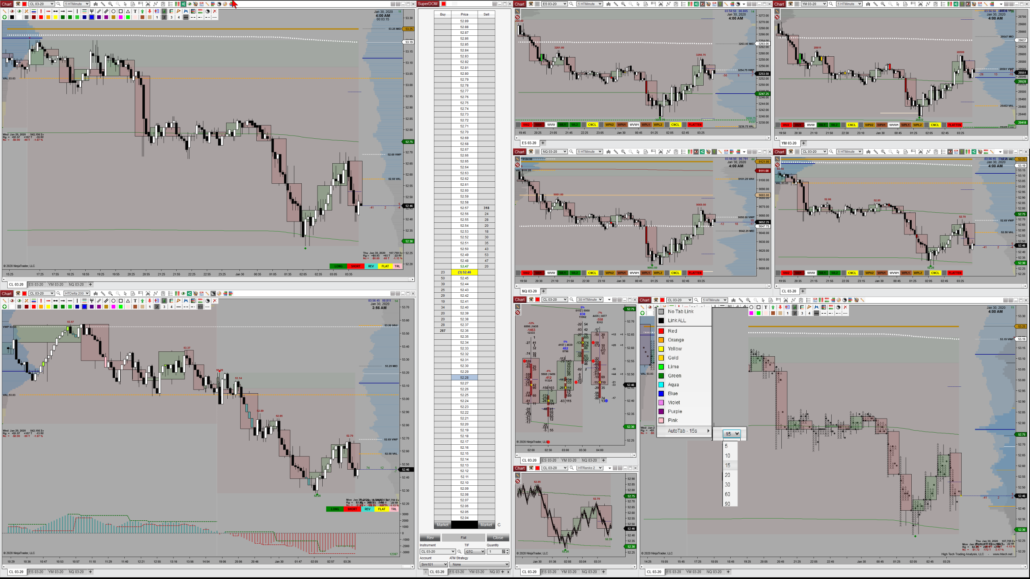
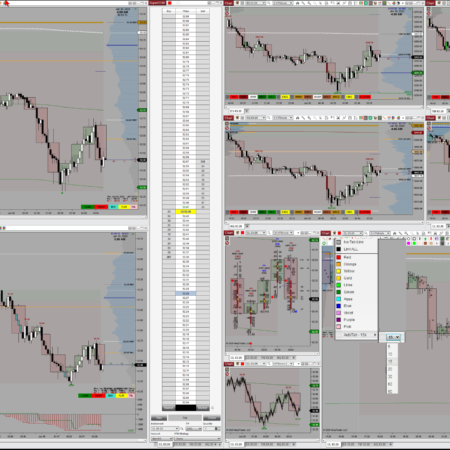
AutoTab adds a Tab Link Selector to the top-left of nearly every NinjaTrader 8 window: charts, SuperDOMs, and most order-entry windows. Set the same link color on the windows you want grouped, change or select a tab on any one of them, and every other window in that color group jumps to the same tab. It is the closest thing to tabbed workspaces in NinjaTrader 8.
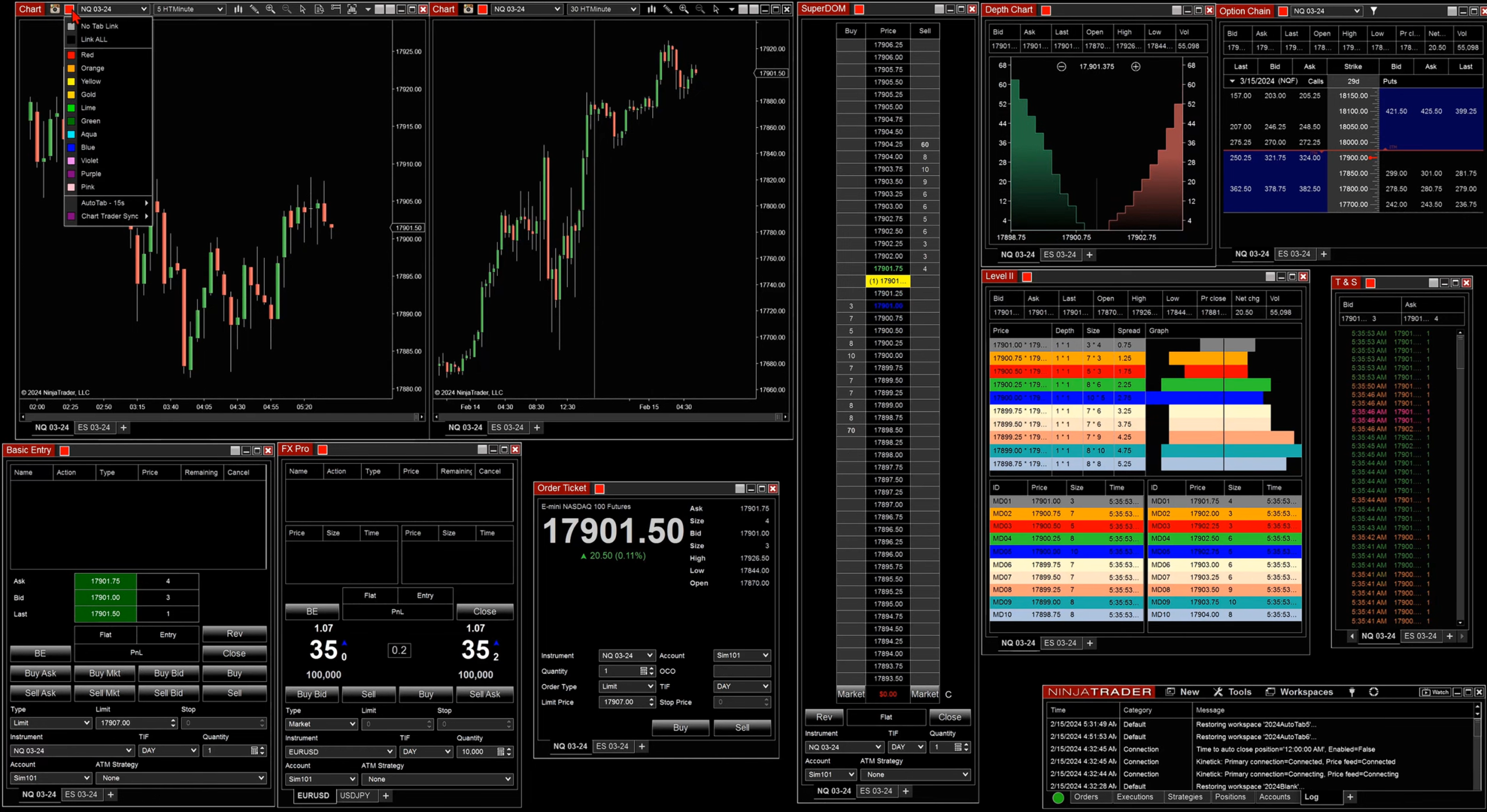
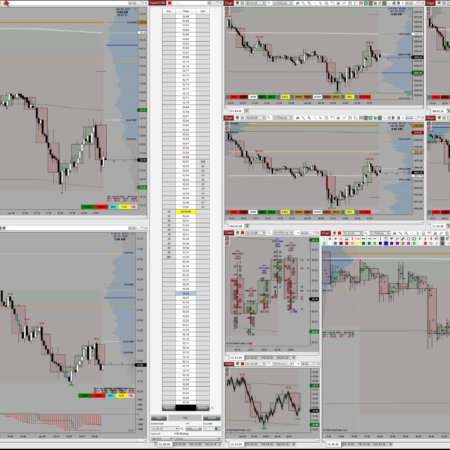
One color group, many windows. AutoTab puts its Tab Link Selector on charts, SuperDOM, Depth Chart, Option Chain, Level II, Time & Sales, Basic Entry, FX Pro, and Order Ticket windows, so a tab change on one moves the whole group.
Inside the AutoTab menu
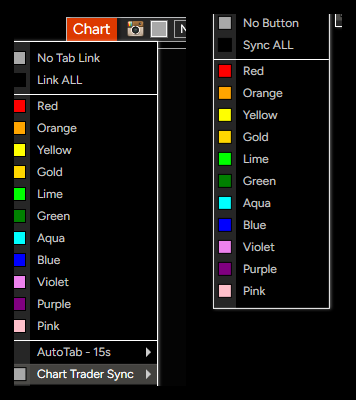
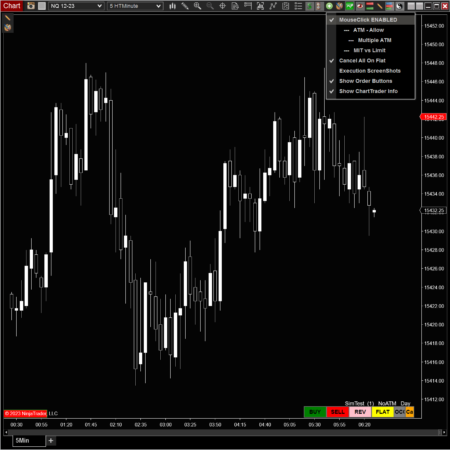
One left-click opens every AutoTab control. Tab-link colors and Chart Trader Sync colors stay two independent groups, so tab movement and trade-panel syncing never collide.
Tab-link colors. Left-click the AutoTab icon to pick No Tab Link, Link ALL, or one of eleven colors. Windows sharing a color move together when you change tabs.
Timed sequencing. Set a timer such as AutoTab – 15s, then middle-click the toolbar icon to cycle a window through its tabs. Middle-click again to stop.
Chart Trader Sync. The submenu on the right carries its own No Button, Sync ALL, and the same eleven colors, so trade-panel sync stays separate from tab linking.
WorkSpace Changer. A separate right-click context menu swaps your whole workspace at once, without leaving the chart.
Chart Trader Sync: push account, quantity, and ATM to only the charts you pick
On a chart, NinjaTrader ties one Chart Trader account, quantity, and ATM strategy across all of that window’s tabs, and separate charts and SuperDOMs never share those settings. Chart Trader Sync fixes that. Pick a sync color and a matching button appears on Chart Trader. Set your account, quantity, or ATM on one chart, click that button, and every chart carrying the same sync-color button takes the same settings.
You decide when
Sync happens on the button click, never automatically, so a window can link tabs without syncing its trade panel.
SuperDOM follows charts
Chart changes flow to a linked SuperDOM; clicking a SuperDOM tab never drives your charts the other way.
Right-click to reinstrument
Right-click the link button and every same-color chart on that instrument switches to your new one at once.
Key features
Adds a Tab Link Selector to nearly every NinjaTrader 8 window, not just charts and DOMs.
Change a tab on one window and every window in the same link color follows to the matching tab.
No Tab Link keeps a window independent; Link ALL groups every chart tab at once.
Timed tab sequencing: middle-click the toolbar icon to cycle tabs on a set interval, middle-click to stop.
Chart Trader Sync pushes account, quantity, and ATM strategy to only the charts sharing its sync color, on a button click.
Tab-link color and sync color are independent, so you can link tabs without syncing the trade panel.
Right-click the link button to switch every same-color chart on the same instrument to a new one at once.
Custom right-click WorkSpace Changer for switching whole workspaces from the chart.
Without AutoTab
Open several charts or NinjaTrader windows for different instruments or views.
Click through each window’s chart tabs separately.
Keep extra windows visible just to avoid losing context.
Manually realign related windows when switching instruments.
With AutoTab
Assign related windows to the same AutoTab color.
Change chart tabs on any window in that color group.
Other windows using that same tab-link color switch to the matching tab.
Keep more context available inside one cleaner workspace.
Common uses
Managing several instruments and views inside one NinjaTrader workspace instead of many.
Keeping a group of charts, DOMs, and order-entry windows aligned to the same tab by color.
Pushing account, quantity, and ATM strategy to a chosen set of charts before an entry.
Trading from a laptop or limited-monitor setup where screen space is tight.
What does AutoTab do?
AutoTab links chart tabs across multiple NinjaTrader 8 windows by color. When you change tabs on one window, other windows assigned to that same tab-link color switch to the matching tab.
Does AutoTab only work with charts?
No. It works across many window types beyond charts and SuperDOM, including TimeAndSales, OrderTicket, BasicEntry, FxPro, OptionChain, DepthChart, Level2, and Replikanto.
Is Chart Trader Sync the same as tab linking?
No. It is a separate color group. Tab linking moves tabs; Chart Trader Sync pushes account, quantity, and ATM strategy to matching charts when you click its button. A window can use one color for tabs and a different color for sync.
How does the AutoTab timer work?
Set a timer value such as AutoTab – 15s, then middle-click the toolbar icon to start cycling that window through its tabs; middle-click again to stop. If you click into one of the linked charts while the timer runs, that chart stays on the tab you are studying while the others keep cycling, by design.
Can I leave some windows unlinked?
Yes. Use No Tab Link when a specific window should stay independent.
Requirements: Windows and NinjaTrader 8.1.2.1 or later.
Video Demonstration of AutoTab 2023 Updates:
(Video Time Line available in YouTube Description)
AutoTab w/WorkSpace Changer v8.21 | NinjaTrader 8 | February 2020
AutoTab Chart/Dom Linking | Original Demonstration Video of Features and Configuration
My Account Downloads
After purchase or access, your available HTech downloads are located in your My Account page. Log in with the same account used for the purchase, then open the Downloads tab in My Account.
Installer Passwords
Most individual HTech products are delivered as password-protected self-installing files. The required installer password is included in your order email. If your order includes multiple products, that email may include multiple product passwords.
Please keep your order email in a safe place for future updates, reinstalls, or computer changes.
Machine ID Registration
All HTech NinjaTrader products require Machine ID registration before they can be used, including free products. Log in to My Account and use the NT8 Registration menu item to register your NinjaTrader Machine ID before starting NinjaTrader with the product installed.
Email Registration
The first time you run an HTech NinjaTrader product, you may be asked to enter your email address. Use the same email address registered on your HTech website account. This is normally a one-time step and should not be required again for regular product updates.
Installation Steps
Close NinjaTrader before installing or updating HTech products. Download your product installer, run the downloaded file, follow the installation prompts, and enter the installer password from your order email when prompted.
After installation, start NinjaTrader. If a Trusted Source message appears, accept it. After accepting the Trusted Source message, restart NinjaTrader once more.
Updates and Reinstalls
Do not uninstall previous versions before updating. HTech installers are designed to install over the existing version. After installing the update, open NinjaTrader and the product will be updated.
Individual product purchases include one year of free updates from the date of purchase. During the active update period, available updates can be downloaded from your My Account page.
All Access
All Access uses a separate installer and access model. Eligible HTech NinjaTrader tools are available while the All Access membership is active. If you already own individual HTech products, those separate purchases remain available under their own license terms. When All Access expires, All Access-only products expire and downloads/access end unless a new membership is purchased.
TradeStation
TradeStation products are discontinued and are no longer available for new purchases. Existing customers may continue using downloads they already purchased or licensed when available, but future updates are not planned and support may be limited.
Help
If you have trouble finding your download, locating your installer password, registering your Machine ID, or installing a product, please contact HTech support.
Individual Products
Individual HTech product purchases include a non-expiring license for the purchased product and one year of free updates from the date of purchase. After the update period ends, the product does not expire. You may continue using the version you already own, but future updates are not included unless a new update period, upgrade, or replacement license is purchased.
All Access
All Access is an annual access membership for eligible HTech NinjaTrader tools. It does not auto-renew and does not automatically bill again. When an All Access membership expires, All Access-only products expire unless you choose to purchase a new membership. Any individual products you purchased separately remain available under their own license terms.
Registration
HTech products require registration before they can be used, including free products. Registration may require your NinjaTrader Machine ID or other licensing information depending on the product. Please review the instructions provided after purchase or access for download, installation, and registration details.
License Use
Licenses are for the original purchaser only and may not be shared, transferred, resold, distributed, or used by multiple customers.
Refunds
HTech products are digital software products. Once a product has been purchased, downloaded, licensed, or accessed, the sale is final and non-refundable.
Support
Support is available through the HTech Discord support channel, Microsoft Teams when available, and direct support contact when needed. HTech makes a reasonable effort to respond within one business day, but support may be limited for third-party platform issues, computer setup, brokerage connections, discontinued products, or platform changes outside HTech’s control.
TradeStation
TradeStation products are discontinued and are no longer available for new purchases. Existing customers may continue using what they already purchased or licensed, but future updates are not planned and support may be limited.
Have an idea that would make this tool better? Post it here, every idea is welcome!
Vote for the ideas you would like built: click the ▲ box (click again to remove your vote).
Visit the Customer Feature Requests page to see and vote on requests for every product.
27 reviews for Auto Tab Linking | NT8(login required to post)
Trading with this tool? Share your experience, every review helps fellow traders!
Visit the Customer Reviews page to read reviews for every product.
Rated 5 out of 5
Alex Koe (verified owner)–
For someone that trades multiple commodities at once, the auto tab tool is a must have.
having to switch between different symbols used to be such a headache..
i truly recommend this tool to anyone that trades multiple instruments.
Rated 5 out of 5
Randy Campbell (verified owner)–
Auto Tab makes following multiple futures symbols in different time frames easy. I follow six symbols on tabs in one window. I have multiple windows with different time frames, 1 min, 5 min, 1 hr,, a range chart, and a daily. I can quickly check all the different time frames for NQ and then switch to the ES. Makes spotting U Turns easier. Before, I would get confused and think that I was looking at Gold and it was actually the Dow. I’ve also added a global time scroll to all the charts except the 1 min.
The HTSync ChartTrader also makes trading easier. Just set the ATM strategy & click the button, then you can easily use the same strategy in multiple time frames. I read that people began asking NinjaTrader for these features back in 2019. Guess they’ll catch up in future versions.
Rated 5 out of 5
Donley Sissom (verified owner)–
AutoTab is a fantastic product. Easy to use, and the customer support is superb. I had a question due to user error a year after purchase and the response and resolution was almost instant!
Rated 5 out of 5
akardar1 (verified owner)–
I have used this product for years and it has saved me thousands of clicks ! Great products and very reliabe !
Highly recommended for assisting with your multi-time-frame analysis
Rated 5 out of 5
Jim Schmelzer (verified owner)–
The Autotab product really made my life in Ninjatrader so much better as I don’t have to keep flipping between different instruments and timeframes during the trading session. Instead, all I have to do is click on the tab of the instrument I want to view and the other timeframes in other charts follow right along and make the picture instantly very clear. Installation of the product worked seamlessly as well and there was no hassle in setting this up in NT from the start. Thank you Steve!
Rated 5 out of 5
Gene Lubker (verified owner)–
Auto Tab for NinjaTrader 8 is a must-have tool for traders seeking to optimize their workspace management and boost their trading efficiency. It has transformed the way I use NinjaTrader, making my trading workflow smoother and more organized. If you’re a NinjaTrader user, I wholeheartedly recommend giving Autotab a try – it’s a game-changer that you won’t want to trade without.
Rated 5 out of 5
jbmiguel (verified owner)–
Great Product glad to have found it! It has cut my charts by 1/2 plus lets me divide my Long-Short Time frames to sequence as programmed vs. clicking all over the place. Highly recommended for those looking to streamline your real-time analysis with accuracy, precision and speed. Can’t live without it now A+++
Rated 5 out of 5
tradedevil (verified owner)–
This is a very slick little product. Ninja traders will be well aware of the difficulty moving from one group of charts to another with the native Ninja tools. Very easy to miss things or you need 16 monitors to watch multiple markets from multiple chart styles. The Auto tab makes it one click easy to get to all your charts for any given asset. It’s very fast since they are already loaded. Set it up one time and it’s good to go. Finally the support from High Tech is excellent. Highly recommended!
Rated 5 out of 5
Theodore Tagalakis (verified owner)–
Awesome product. Makes scanning multiple timeframes easier and more efficient. Not just is the product excellent but the customer service/tech support is super responsive. Great experience and well worth the investment!
Rated 5 out of 5
Ed (verified owner)–
I have used Auto Tab for several years now and it is a fantastic product. There is simply no comparing the efficiency to my trading it provides between using it and not using. Watch the videos. They succinctly summarize the benefits. I would also agree with what Joe Sykora had to say concerning performance. NT seems to run a little bit smoother with Auto Tab compared to running the same number of tabs as separate windows. Add to that whenever I have had a problem Steve has always responded promptly and always with a wish to make sure that my problem has been solved.
Rated 5 out of 5
Mark (verified owner)–
Very helpful organizational utility for my workspaces. Works perfectly and Steve is always quick to reply with customer service.
Rated 5 out of 5
akardar1 (verified owner)–
Fantastic Product
Fantastic Service
Rated 5 out of 5
Mailman (verified owner)–
This saves me a lot of time and thus money. I have it set to cycle through all my tabs at 10 second intervals so that, at a glance and without a single click, I can stay appraised of each instrument and timeframe in which I’m interested. No issues with installation or use. I had one question about its operation and, within hours and on a Saturday, Steve had answered me with guidance on how to achieve what I wanted to do, and it worked. HTT is a model of great customer support.
Rated 5 out of 5
traderalex81 (verified owner)–
Love it! Steve has very solid indicators. I own pretty much all of them and use them daily. Thanks!
Rated 5 out of 5
Joe Sykora (verified owner)–
Thank you Steve for a fantastic tool. An important discovery I found with Ninjatrader is that the more charts that are open, i.e. displayed behind or side by side, the performance degrades significantly due to graphics being written and causing soft page faults (the moving of memory blocks). By using tabs, the inactive tabs seem to be like minimized windows and thus cause far fewer soft page faults. So now being able to link the tabs in a useful way opens the way for quickly seeing relationships without impacting performance.
Rated 5 out of 5
stephan.blaser (verified owner)–
Absolutely great!! :)
It’s a very helpful tool to switch all separate windows in no time, very efficient to the same market!
Thanks a lot and kind regards from Switzerland, Stephan
Rated 5 out of 5
akr (verified owner)–
Very useful tool . Very good support!
Rated 5 out of 5
Christian (verified owner)–
Alles superklasse!
Rated 5 out of 5
marketp (verified owner)–
I used to have 4 monitors with the charts scattered on the screens, happens that they were out of my field of vision and could never be aware of these charts, now I have everything concentrated in front of my eyes (2 monitors) and change the futures contract with the speed of a click, fantastic tool, fast and efficient support, highly recommended
Rated 5 out of 5
anthonywood (verified owner)–
AutoTab is excellent, it’s a feature that NJ8 really should have built-in so I was so pleased when I found this add-on. As for HighTech Trading Analysis, Steve is excellent, fast efficient support and honesty which is rare in this business. I highly recommend not only this indicator but this company too.
Rated 5 out of 5
Graham (verified owner)–
Great product and great service. Very usual and has saved me loads of time and confusion as it switches all my charts at the same time..
Rated 5 out of 5
nd00001 (verified owner)–
Very efficient for switching all charts to one instrument with one click. Time saving and very comfortable.
Rated 5 out of 5
Michael (verified owner)–
One of the big benefits of Ninjatrader 8 is the ability multiple chart tabs. This is especially useful if you have limited screen space. As I started working with this, I realized that I was getting my multiple time frame charts confused. They weren’t linked or coordinated at all. When I saw that High Tech had an indicator to link them correctly, I jumped at it. Now, if I hit the NQ tab on one chart, for example, my other windows go to their respective NQ chart. My multiple time frame chart all appear at once and coordinated as they should. Steve is pretty smart creating this, and he does good work. It’s greatly needed. I’ve also gotten timely support from Hight Tech on any questions that I have had.
Rated 5 out of 5
Darcy (verified owner)–
Fantastic organizational tool for NT8 charts. If you get frustrated with the way you have to set up NT7 workspaces you will surely come to appreciate this as a valuable, time-saving tool.
Rated 5 out of 5
Eric (verified owner)–
For any trader following multiple instruments over a number of time-frames on a multi-monitor configuration or large monitor, the Auto Tab product for NT8 is a welcome addition – With a single click on a Tab, the charts are all synced to change to the respective instrument.
The Built in Configurable Timer also allows the user to auto scroll charts in a separate Chart window.
Thank you Steve for a quality product.
Rated 5 out of 5
akardar1 (verified owner)–
Great product, I am using it to view circa 35 product across 3 times frames..
Great way to efficiently scroll through my charts



Alex Koe (verified owner) –
For someone that trades multiple commodities at once, the auto tab tool is a must have.
having to switch between different symbols used to be such a headache..
i truly recommend this tool to anyone that trades multiple instruments.
Randy Campbell (verified owner) –
Auto Tab makes following multiple futures symbols in different time frames easy. I follow six symbols on tabs in one window. I have multiple windows with different time frames, 1 min, 5 min, 1 hr,, a range chart, and a daily. I can quickly check all the different time frames for NQ and then switch to the ES. Makes spotting U Turns easier. Before, I would get confused and think that I was looking at Gold and it was actually the Dow. I’ve also added a global time scroll to all the charts except the 1 min.
The HTSync ChartTrader also makes trading easier. Just set the ATM strategy & click the button, then you can easily use the same strategy in multiple time frames. I read that people began asking NinjaTrader for these features back in 2019. Guess they’ll catch up in future versions.
Donley Sissom (verified owner) –
AutoTab is a fantastic product. Easy to use, and the customer support is superb. I had a question due to user error a year after purchase and the response and resolution was almost instant!
akardar1 (verified owner) –
I have used this product for years and it has saved me thousands of clicks ! Great products and very reliabe !
Highly recommended for assisting with your multi-time-frame analysis
Jim Schmelzer (verified owner) –
The Autotab product really made my life in Ninjatrader so much better as I don’t have to keep flipping between different instruments and timeframes during the trading session. Instead, all I have to do is click on the tab of the instrument I want to view and the other timeframes in other charts follow right along and make the picture instantly very clear. Installation of the product worked seamlessly as well and there was no hassle in setting this up in NT from the start. Thank you Steve!
Gene Lubker (verified owner) –
Auto Tab for NinjaTrader 8 is a must-have tool for traders seeking to optimize their workspace management and boost their trading efficiency. It has transformed the way I use NinjaTrader, making my trading workflow smoother and more organized. If you’re a NinjaTrader user, I wholeheartedly recommend giving Autotab a try – it’s a game-changer that you won’t want to trade without.
jbmiguel (verified owner) –
Great Product glad to have found it! It has cut my charts by 1/2 plus lets me divide my Long-Short Time frames to sequence as programmed vs. clicking all over the place. Highly recommended for those looking to streamline your real-time analysis with accuracy, precision and speed. Can’t live without it now A+++
tradedevil (verified owner) –
This is a very slick little product. Ninja traders will be well aware of the difficulty moving from one group of charts to another with the native Ninja tools. Very easy to miss things or you need 16 monitors to watch multiple markets from multiple chart styles. The Auto tab makes it one click easy to get to all your charts for any given asset. It’s very fast since they are already loaded. Set it up one time and it’s good to go. Finally the support from High Tech is excellent. Highly recommended!
Theodore Tagalakis (verified owner) –
Awesome product. Makes scanning multiple timeframes easier and more efficient. Not just is the product excellent but the customer service/tech support is super responsive. Great experience and well worth the investment!
Ed (verified owner) –
I have used Auto Tab for several years now and it is a fantastic product. There is simply no comparing the efficiency to my trading it provides between using it and not using. Watch the videos. They succinctly summarize the benefits. I would also agree with what Joe Sykora had to say concerning performance. NT seems to run a little bit smoother with Auto Tab compared to running the same number of tabs as separate windows. Add to that whenever I have had a problem Steve has always responded promptly and always with a wish to make sure that my problem has been solved.
Mark (verified owner) –
Very helpful organizational utility for my workspaces. Works perfectly and Steve is always quick to reply with customer service.
akardar1 (verified owner) –
Fantastic Product
Fantastic Service
Mailman (verified owner) –
This saves me a lot of time and thus money. I have it set to cycle through all my tabs at 10 second intervals so that, at a glance and without a single click, I can stay appraised of each instrument and timeframe in which I’m interested. No issues with installation or use. I had one question about its operation and, within hours and on a Saturday, Steve had answered me with guidance on how to achieve what I wanted to do, and it worked. HTT is a model of great customer support.
traderalex81 (verified owner) –
Love it! Steve has very solid indicators. I own pretty much all of them and use them daily. Thanks!
Joe Sykora (verified owner) –
Thank you Steve for a fantastic tool. An important discovery I found with Ninjatrader is that the more charts that are open, i.e. displayed behind or side by side, the performance degrades significantly due to graphics being written and causing soft page faults (the moving of memory blocks). By using tabs, the inactive tabs seem to be like minimized windows and thus cause far fewer soft page faults. So now being able to link the tabs in a useful way opens the way for quickly seeing relationships without impacting performance.
stephan.blaser (verified owner) –
Absolutely great!! :)
It’s a very helpful tool to switch all separate windows in no time, very efficient to the same market!
Thanks a lot and kind regards from Switzerland, Stephan
akr (verified owner) –
Very useful tool . Very good support!
Christian (verified owner) –
Alles superklasse!
marketp (verified owner) –
I used to have 4 monitors with the charts scattered on the screens, happens that they were out of my field of vision and could never be aware of these charts, now I have everything concentrated in front of my eyes (2 monitors) and change the futures contract with the speed of a click, fantastic tool, fast and efficient support, highly recommended
anthonywood (verified owner) –
AutoTab is excellent, it’s a feature that NJ8 really should have built-in so I was so pleased when I found this add-on. As for HighTech Trading Analysis, Steve is excellent, fast efficient support and honesty which is rare in this business. I highly recommend not only this indicator but this company too.
Graham (verified owner) –
Great product and great service. Very usual and has saved me loads of time and confusion as it switches all my charts at the same time..
nd00001 (verified owner) –
Very efficient for switching all charts to one instrument with one click. Time saving and very comfortable.
Michael (verified owner) –
One of the big benefits of Ninjatrader 8 is the ability multiple chart tabs. This is especially useful if you have limited screen space. As I started working with this, I realized that I was getting my multiple time frame charts confused. They weren’t linked or coordinated at all. When I saw that High Tech had an indicator to link them correctly, I jumped at it. Now, if I hit the NQ tab on one chart, for example, my other windows go to their respective NQ chart. My multiple time frame chart all appear at once and coordinated as they should. Steve is pretty smart creating this, and he does good work. It’s greatly needed. I’ve also gotten timely support from Hight Tech on any questions that I have had.
Darcy (verified owner) –
Fantastic organizational tool for NT8 charts. If you get frustrated with the way you have to set up NT7 workspaces you will surely come to appreciate this as a valuable, time-saving tool.
Eric (verified owner) –
For any trader following multiple instruments over a number of time-frames on a multi-monitor configuration or large monitor, the Auto Tab product for NT8 is a welcome addition – With a single click on a Tab, the charts are all synced to change to the respective instrument.
The Built in Configurable Timer also allows the user to auto scroll charts in a separate Chart window.
Thank you Steve for a quality product.
akardar1 (verified owner) –
Great product, I am using it to view circa 35 product across 3 times frames..
Great way to efficiently scroll through my charts
roger (verified owner) –
great product very useful utility.