Color and style your NinjaTrader drawings with a single click.
The NinjaTrader 8 Color Style ToolBar puts a customizable color and style toolbar right on your chart. Set a color, line style, width, text style, or opacity once, then draw in it, with no drawing properties window to open and no styling menus to hunt through while you are reading live price action.
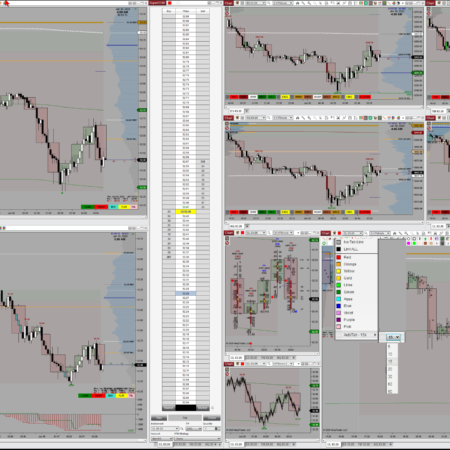
Draw with your function keys, the NinjaTrader dropdown, or the DrawBar and the toolbar styles the result the same way every time. Restyle an object you already drew just as quickly, so a chart full of trade plans, zones, and levels can be recolored or cleaned up in seconds without reopening a single dialog.
On-chart color and style controls
Color Style ToolBar keeps the drawing style controls you use most right next to the chart, including color swatches, several line widths, the available line styles, text styling, and an opacity control, all one click away.
How the Color Style ToolBar works on your NinjaTrader 8 chart
Collapse or open the bar
Left-click the far-left icon to collapse the bar to one icon or open it again. Collapsed, new drawings use NinjaTrader defaults; open, they use the toolbar style.
Set the active style with one click
A single click on a color, width, line style, or text style makes it the active toolbar style, so every new object you draw picks it up with no properties window.
Restyle what you already drew
Select a drawing, then click it again to apply the current toolbar style. A single click only selects, so you never recolor an object you are working on by accident.
Keep the default template when you want
An option keeps your first-drawn objects on their default template while the bar stays open, so you apply the toolbar style later, only when you want it.
Set opacity on filled regions
Roll the opacity control and a live 0 to 100 value shows at the cursor, taking zones, rectangles, and regions from solid to fully clear over price.
Works with every way you draw
The DrawBar, the NinjaTrader dropdown, and your function keys all produce the same styled object, so the bar fits the workflow you already use every day.
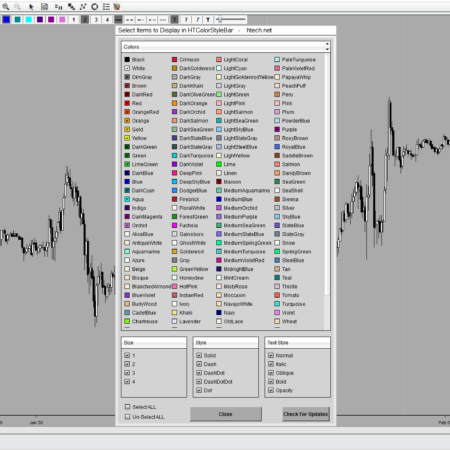
Make the bar yours: left-click the Color Style ToolBar icon on your NinjaTrader toolbar to open the picker, then turn individual colors, sizes, line styles, text styles, and opacity on or off, from favorites to the full list.
Mount the NinjaTrader 8 Color Style ToolBar at the top or the left of the chart, wherever it fits your layout, and set its background and selection colors to match a light or dark chart.
Without the toolbar
Draw a new object, or select one already sitting on your chart.
Open the NinjaTrader drawing properties window for that object.
Change the color, line style, width, or fill opacity you need.
Close the dialog and get back to reading the live chart.
With Color Style ToolBar
Click a color, style, width, or opacity on the toolbar to set it.
Draw, and the new object uses it, from the DrawBar, the dropdown, or a function key.
To restyle something already drawn, select it, then click it again to apply the style.
Left-click the far-left icon to collapse the bar to a single icon when you want a clean chart.
Common uses
Rapidly switching colors while marking up trade plans, zones, levels, and notes.
Drawing new objects in a chosen color and style from the DrawBar, the dropdown, or your function keys.
Recoloring or restyling drawings already on the chart in a few clicks.
Adjusting fill opacity so zones and regions stay visible without covering price action.
Keeping only the style controls you use most often within reach, and collapsing the bar for a clean chart.
DrawBar Ultimate relationship: Color Style ToolBar is also included with DrawBar Ultimate, where it is kept up to date to color and style all of its custom drawing tools. Buy it on its own for the focused color and style workflow, or step up to DrawBar Ultimate for the full custom drawing suite.
See it in action: the Video tab above plays a full walkthrough of Color Style ToolBar on a live chart, coloring, styling, and adjusting opacity on real drawings.
Frequently asked questions
Does this replace NinjaTrader drawing tools?
No. It works alongside NinjaTrader drawing tools, keeping the color and style controls you reach for most right next to the chart.
Which drawing tools can it color and style?
The NinjaTrader 8 Color Style ToolBar styles NinjaTrader’s built-in drawing tools and the custom drawing tools included in DrawBar Ultimate. It is unlikely to style tools from other vendors, since those do not always expose the code it needs to change them.
Will it change a drawing by accident?
No. A single click only selects a drawing. The toolbar style is applied after that, when you click the selected object again or change a control, so an accidental click will not restyle your chart.
What happens when the toolbar is collapsed?
Left-click the far-left icon and the bar collapses to that single icon. New drawings use their normal NinjaTrader default colors and styles until you open the bar again or apply styling intentionally.
How do I remove the toolbar from the chart?
Middle-click the Color Style ToolBar icon on your NinjaTrader toolbar to hide the entire bar. To just tuck it away instead, left-click the far-left palette icon on the bar to collapse it to a single icon.
Is this included with DrawBar Ultimate?
Yes. DrawBar Ultimate already includes Color Style ToolBar, so DrawBar owners have it built in. This page is for buyers who want the focused color and style toolbar on its own.
Requirements: Windows and NinjaTrader 8.1.2.1 or later.
Here is another Great Supplemental Product that will make initially Drawing your Objects a Snap
My Account Downloads
After purchase or access, your available HTech downloads are located in your My Account page. Log in with the same account used for the purchase, then open the Downloads tab in My Account.
Installer Passwords
Most individual HTech products are delivered as password-protected self-installing files. The required installer password is included in your order email. If your order includes multiple products, that email may include multiple product passwords.
Please keep your order email in a safe place for future updates, reinstalls, or computer changes.
Machine ID Registration
All HTech NinjaTrader products require Machine ID registration before they can be used, including free products. Log in to My Account and use the NT8 Registration menu item to register your NinjaTrader Machine ID before starting NinjaTrader with the product installed.
Email Registration
The first time you run an HTech NinjaTrader product, you may be asked to enter your email address. Use the same email address registered on your HTech website account. This is normally a one-time step and should not be required again for regular product updates.
Installation Steps
Close NinjaTrader before installing or updating HTech products. Download your product installer, run the downloaded file, follow the installation prompts, and enter the installer password from your order email when prompted.
After installation, start NinjaTrader. If a Trusted Source message appears, accept it. After accepting the Trusted Source message, restart NinjaTrader once more.
Updates and Reinstalls
Do not uninstall previous versions before updating. HTech installers are designed to install over the existing version. After installing the update, open NinjaTrader and the product will be updated.
Individual product purchases include one year of free updates from the date of purchase. During the active update period, available updates can be downloaded from your My Account page.
All Access
All Access uses a separate installer and access model. Eligible HTech NinjaTrader tools are available while the All Access membership is active. If you already own individual HTech products, those separate purchases remain available under their own license terms. When All Access expires, All Access-only products expire and downloads/access end unless a new membership is purchased.
TradeStation
TradeStation products are discontinued and are no longer available for new purchases. Existing customers may continue using downloads they already purchased or licensed when available, but future updates are not planned and support may be limited.
Help
If you have trouble finding your download, locating your installer password, registering your Machine ID, or installing a product, please contact HTech support.
Individual Products
Individual HTech product purchases include a non-expiring license for the purchased product and one year of free updates from the date of purchase. After the update period ends, the product does not expire. You may continue using the version you already own, but future updates are not included unless a new update period, upgrade, or replacement license is purchased.
All Access
All Access is an annual access membership for eligible HTech NinjaTrader tools. It does not auto-renew and does not automatically bill again. When an All Access membership expires, All Access-only products expire unless you choose to purchase a new membership. Any individual products you purchased separately remain available under their own license terms.
Registration
HTech products require registration before they can be used, including free products. Registration may require your NinjaTrader Machine ID or other licensing information depending on the product. Please review the instructions provided after purchase or access for download, installation, and registration details.
License Use
Licenses are for the original purchaser only and may not be shared, transferred, resold, distributed, or used by multiple customers.
Refunds
HTech products are digital software products. Once a product has been purchased, downloaded, licensed, or accessed, the sale is final and non-refundable.
Support
Support is available through the HTech Discord support channel, Microsoft Teams when available, and direct support contact when needed. HTech makes a reasonable effort to respond within one business day, but support may be limited for third-party platform issues, computer setup, brokerage connections, discontinued products, or platform changes outside HTech’s control.
TradeStation
TradeStation products are discontinued and are no longer available for new purchases. Existing customers may continue using what they already purchased or licensed, but future updates are not planned and support may be limited.
Have an idea that would make this tool better? Post it here, every idea is welcome!
Vote for the ideas you would like built: click the ▲ box (click again to remove your vote).
Visit the Customer Feature Requests page to see and vote on requests for every product.
7 reviews for Color Style ToolBar | NT8(login required to post)
Trading with this tool? Share your experience, every review helps fellow traders!
Visit the Customer Reviews page to read reviews for every product.
Rated 5 out of 5
Alex Koe (verified owner)–
I have tried almost all of the drawing tools out that in the market. But this version of drawling tool by high tech is the best there is in the market.. easy to customized and use.. since then i have not looked else where.. i have it as a default indicator in all of my charts..
Rated 5 out of 5
cxk402 (verified owner)–
I had to recover my entire disk from a backup drive. My files were all there, but various licenses had to be manually restored including NinjaTrader and therefore this tool. The support was prompt and clear which enabled me to get back up and running easily. I use DrawBar and ColorBar extensively and I can’t imagine trading without them. I researched extensively before the purchase and after a couple years now, I could not be more pleased with the products.
Rated 5 out of 5
roger (verified owner)–
absolute best hands down.
Rated 5 out of 5
Chuck (verified owner)–
Steve’s Color/Style Toolbar is so good, I feel compelled to share this for the benefit of fellow traders. Being able to draw on my charts is critical to identifying my entry and exit areas, and I combine this drawing tool with Steve’s Drawing Toolbar to totally control my drawing and to be able to customize it exactly the way I want my charts. The whole key is to be able to accurately identify my entires and exits, and these two tools help me do that. In addition, HTech’s customer service is better than anyone else’s. I appreciate that very much.
Rated 5 out of 5
Jason (verified owner)–
I purchased the Color Style Toolbar back when it was in its infancy. Not only has it become a leading indicator necessary for my work, but before it’s final release, HT was relentless in tackling any minor glitch that needed to be addressed in a timely manner. Customer service is just as important to me as getting a high quality product. The HT team did a fantastic job with this one – keep up the great work and many thanks for all your time and effort!!
Rated 5 out of 5
Zoltan (verified owner)–
We bought both Drawing Toolbar and Color/Style Toolbar – they actually go hand in hand – and they’re both amazing. We put them on 22 different chart windows, they run like a champ, like they were always part of Ninja 8. These tools are like life-saver to us, we do/draw everything by hand, so these tools took away that horrible “right click, select, go back, right click…” drawing process.
Design, performance, reliability (which is a huge part of any Ninja 7/8 tools) is STUNNING, also, the customization is simple and straight to the point. These tools have no flaws or any errors. We do heavy – duty use them, almost all day.
Support is beyond excellent, lightning fast and truly honest – 100% satisfaction!!!
Thank you for these awesome products and the very friendly support, keep up the great work!
Rated 5 out of 5
Eric (verified owner)–
The Color Style ToolBar is a great addition to the Drawing ToolBar – Access to all colors.
Changing style parameters are all done with the click of a button – Marking up charts couldn’t be easier.
Thanks Steve for your ongoing support and for an all-round great product !!

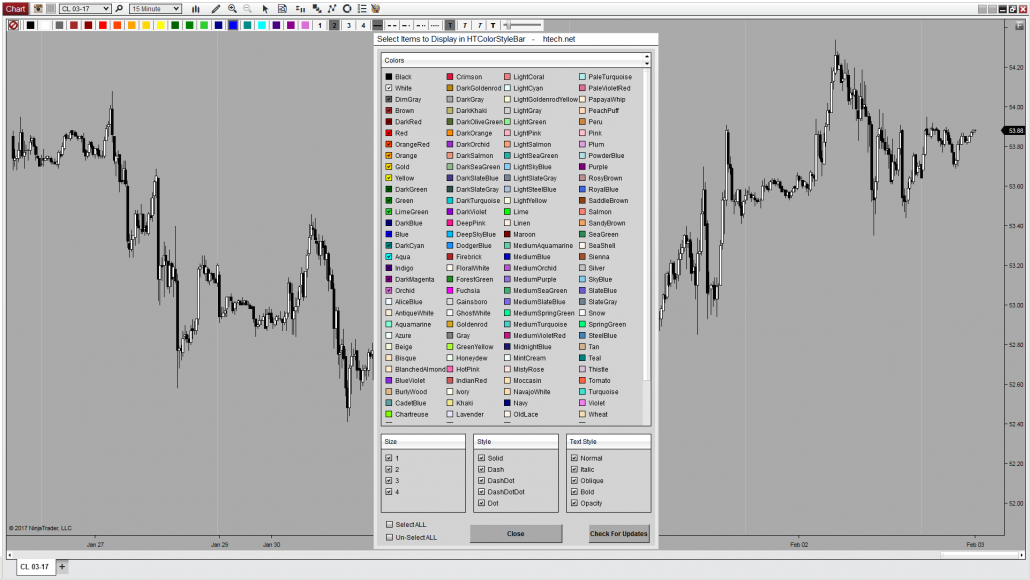

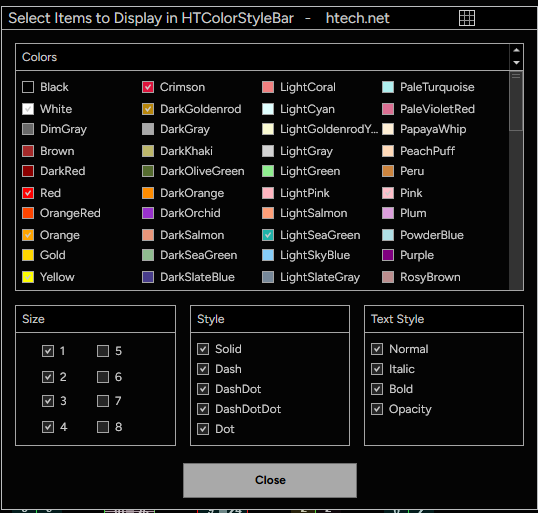 Make the bar yours: left-click the Color Style ToolBar icon on your NinjaTrader toolbar to open the picker, then turn individual colors, sizes, line styles, text styles, and opacity on or off, from favorites to the full list.


Alex Koe (verified owner) –
I have tried almost all of the drawing tools out that in the market. But this version of drawling tool by high tech is the best there is in the market.. easy to customized and use.. since then i have not looked else where.. i have it as a default indicator in all of my charts..
cxk402 (verified owner) –
I had to recover my entire disk from a backup drive. My files were all there, but various licenses had to be manually restored including NinjaTrader and therefore this tool. The support was prompt and clear which enabled me to get back up and running easily. I use DrawBar and ColorBar extensively and I can’t imagine trading without them. I researched extensively before the purchase and after a couple years now, I could not be more pleased with the products.
roger (verified owner) –
absolute best hands down.
Chuck (verified owner) –
Steve’s Color/Style Toolbar is so good, I feel compelled to share this for the benefit of fellow traders. Being able to draw on my charts is critical to identifying my entry and exit areas, and I combine this drawing tool with Steve’s Drawing Toolbar to totally control my drawing and to be able to customize it exactly the way I want my charts. The whole key is to be able to accurately identify my entires and exits, and these two tools help me do that. In addition, HTech’s customer service is better than anyone else’s. I appreciate that very much.
Jason (verified owner) –
I purchased the Color Style Toolbar back when it was in its infancy. Not only has it become a leading indicator necessary for my work, but before it’s final release, HT was relentless in tackling any minor glitch that needed to be addressed in a timely manner. Customer service is just as important to me as getting a high quality product. The HT team did a fantastic job with this one – keep up the great work and many thanks for all your time and effort!!
Zoltan (verified owner) –
We bought both Drawing Toolbar and Color/Style Toolbar – they actually go hand in hand – and they’re both amazing. We put them on 22 different chart windows, they run like a champ, like they were always part of Ninja 8. These tools are like life-saver to us, we do/draw everything by hand, so these tools took away that horrible “right click, select, go back, right click…” drawing process.
Design, performance, reliability (which is a huge part of any Ninja 7/8 tools) is STUNNING, also, the customization is simple and straight to the point. These tools have no flaws or any errors. We do heavy – duty use them, almost all day.
Support is beyond excellent, lightning fast and truly honest – 100% satisfaction!!!
Thank you for these awesome products and the very friendly support, keep up the great work!
Eric (verified owner) –
The Color Style ToolBar is a great addition to the Drawing ToolBar – Access to all colors.
Changing style parameters are all done with the click of a button – Marking up charts couldn’t be easier.
Thanks Steve for your ongoing support and for an all-round great product !!