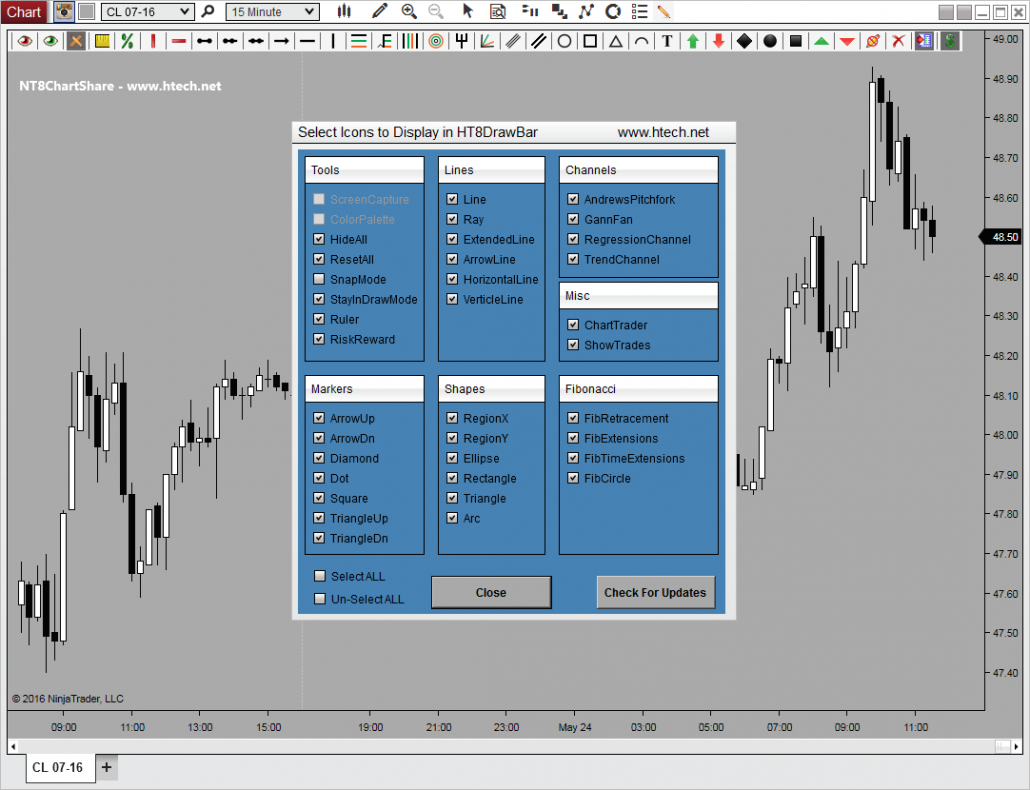
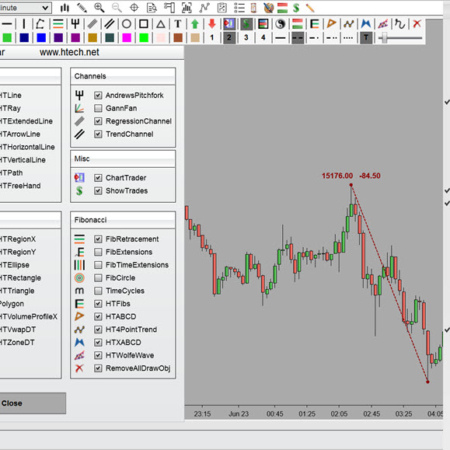
This NinjaTrader 8 Drawing ToolBar Indicator was specifically designed for the ease and convenience of drawing on your charts. Draw, Show, and/or Hide Any manually drawn object with a single click. Perfect for both the novice and/or expert trader. Through the use of manually drawn objects (lines, rays, Fibonacci’s, pitchforks, ellipses, rectangles, triangles, and various other shapes) it can make identifying market rotation and cycles, trends, geometric patterns, supply and demand, turning points, and determining specific areas of interest a snap. This drawing tool enhances the built in capabilities of NinjaTrader, is extremely easy to use, will save you a ton of time, and will provide the ultimate in convenience and technical analysis to any trader.
– Add a Customizable Drawing ToolBar to Any/All NinjaTrader 8 Charts.
– Draw, Show, and/or Hide any Manually Drawn Object with a Single Click
– Single Click Pop-Up Window for Easy User Selectable Options and Adjustments.
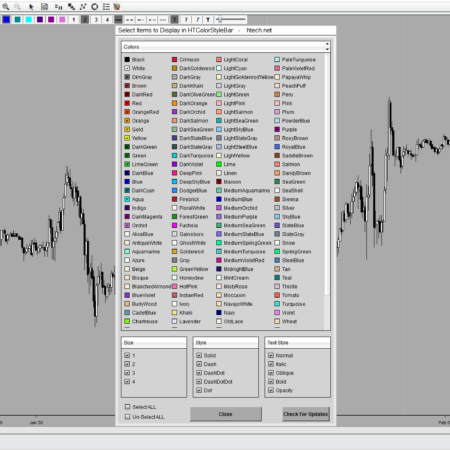
– Individually Select the Draw Object Icons You’d Like to Display in Toolbar
– Selectable Mounting to the Top or Left Hand Side of your Chart (coming soon)
– Show/Hide the Entire Drawing ToolBar with a Single Middle Click
– Show/Hide Chart Trader Button
– Show/Hide Trade Executions Button
DrawBar Ultimate – April 2021 Updates – thru DBU Version 8.37
DrawBar Ultimate – Added Features & Configuration – September 2019 – thru Version 8.31
Detailed Explaination of DrawBar Ultimate, ALL Features, Properties, Set-Up, and Configuration:
Another Vid on the Basic Features of DrawBar:
Another Vid of Basic Features of Color Style ToolBar
Individual Products
Individual HTech product purchases include a non-expiring license for the purchased product and one year of free updates from the date of purchase. After the update period ends, the product does not expire. You may continue using the version you already own, but future updates are not included unless a new update period, upgrade, or replacement license is purchased.
All Access
All Access is an annual access membership for eligible HTech NinjaTrader tools. It does not auto-renew and does not automatically bill again. When an All Access membership expires, All Access-only products expire unless you choose to purchase a new membership. Any individual products you purchased separately remain available under their own license terms.
Registration
HTech products require registration before they can be used, including free products. Registration may require your NinjaTrader Machine ID or other licensing information depending on the product. Please review the instructions provided after purchase or access for download, installation, and registration details.
License Use
Licenses are for the original purchaser only and may not be shared, transferred, resold, distributed, or used by multiple customers.
Refunds
HTech products are digital software products. Once a product has been purchased, downloaded, licensed, or accessed, the sale is final and non-refundable.
Support
Support is available through the HTech Discord support channel, Microsoft Teams when available, and direct support contact when needed. HTech makes a reasonable effort to respond within one business day, but support may be limited for third-party platform issues, computer setup, brokerage connections, discontinued products, or platform changes outside HTech’s control.
TradeStation
TradeStation products are discontinued and are no longer available for new purchases. Existing customers may continue using what they already purchased or licensed, but future updates are not planned and support may be limited.
Have an idea that would make this tool better? Post it here, every idea is welcome!
Vote for the ideas you would like built: click the ▲ box (click again to remove your vote).
Visit the Customer Feature Requests page to see and vote on requests for every product.
4 reviews for Drawing ToolBar | NT8(login required to post)
Trading with this tool? Share your experience, every review helps fellow traders!
Visit the Customer Reviews page to read reviews for every product.
Rated 5 out of 5
Chuck (verified owner)–
I rarely write reviews on anything, but Steve’s Drawing Toolbar is so good, I feel compelled to share this for the benefit of fellow traders. This drawing tool is the best drawing tool for NinjaTrader, bar none. Being able to draw on my charts is critical to identifying my entry and exit areas, and this tool does that better than any drawing tool, and it does it so conveniently. I like fast and simple, and I can do my drawing quickly and easily. I combine this drawing tool with Steve’s Color/Style Toolbar to totally control my drawing and to be able to customize it exactly the way I want my charts. The whole key is to be able to accurately identify my entires and exits, and these two tools help me do that. In addition, HTech’s customer service is better than anyone else’s, so if I have a need for an indicator, who am I going to buy it from? Yea, that’s easy–HTech. Hey, I realize this may sound like an advertisement or like I got paid. It’s not, and I didn’t. I just appreciate when someone creates a great product and supports it as well.
Rated 5 out of 5
Jason (verified owner)–
Along with the Color Style Toolbar, I can’t say enough good things about this handy indicator! Being able to customize exactly what I want to see, without having to sift through some drop down menu of things I don’t — makes this tool a priceless addition to the my belt. I can’t say enough about how important the value of customer service plays into where I choose to spend my money. HT is a model of how companies should take care of their customers after the sale. If you’re using NT 8, you NEED this indicator!!
Rated 5 out of 5
Zoltan (verified owner)–
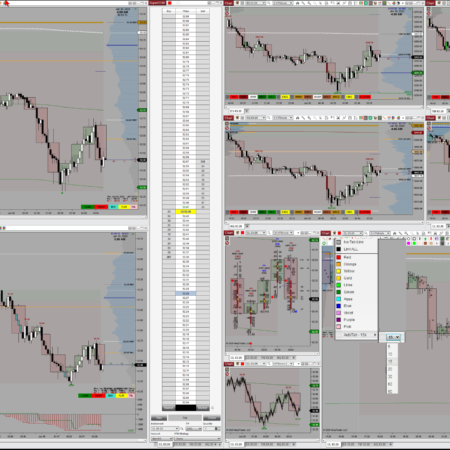
We bought both Drawing Toolbar and Color/Style Toolbar – they actually go hand in hand – and they’re both amazing. We put them on 22 different chart windows, they run like a champ, like they were always part of Ninja 8. These tools are like life-saver to us, we do/draw everything by hand, so these tools took away that horrible “right click, select, go back, right click…” drawing process.
Design, performance, reliability (which is a huge part of any Ninja 7/8 tools) is STUNNING, also, the customization is simple and straight to the point. These tools have no flaws or any errors. We do heavy – duty use them, almost all day.
Support is beyond excellent, lightning fast and truly honest – 100% satisfaction!!!
Thank you for these awesome products and the very friendly support, keep up the great work!
Rated 5 out of 5
Eric (verified owner)–
The Drawing Toolbar is an excellent tool which is so easy to customise. Also love the fact that you have ready access to Chart Trader and Trade Markers.
Ongoing support has been brilliant – Thank you Steve for a quality product.
No hesitation in recommending the Drawing Toolbar for NinjaTrader 8 – 10 out of 10 !!
My Account Downloads
After purchase or access, your available HTech downloads are located in your My Account page. Log in with the same account used for the purchase, then open the Downloads tab in My Account.
Installer Passwords
Most individual HTech products are delivered as password-protected self-installing files. The required installer password is included in your order email. If your order includes multiple products, that email may include multiple product passwords.
Please keep your order email in a safe place for future updates, reinstalls, or computer changes.
Machine ID Registration
All HTech NinjaTrader products require Machine ID registration before they can be used, including free products. Log in to My Account and use the NT8 Registration menu item to register your NinjaTrader Machine ID before starting NinjaTrader with the product installed.
Email Registration
The first time you run an HTech NinjaTrader product, you may be asked to enter your email address. Use the same email address registered on your HTech website account. This is normally a one-time step and should not be required again for regular product updates.
Installation Steps
Close NinjaTrader before installing or updating HTech products. Download your product installer, run the downloaded file, follow the installation prompts, and enter the installer password from your order email when prompted.
After installation, start NinjaTrader. If a Trusted Source message appears, accept it. After accepting the Trusted Source message, restart NinjaTrader once more.
Updates and Reinstalls
Do not uninstall previous versions before updating. HTech installers are designed to install over the existing version. After installing the update, open NinjaTrader and the product will be updated.
Individual product purchases include one year of free updates from the date of purchase. During the active update period, available updates can be downloaded from your My Account page.
All Access
All Access uses a separate installer and access model. Eligible HTech NinjaTrader tools are available while the All Access membership is active. If you already own individual HTech products, those separate purchases remain available under their own license terms. When All Access expires, All Access-only products expire and downloads/access end unless a new membership is purchased.
TradeStation
TradeStation products are discontinued and are no longer available for new purchases. Existing customers may continue using downloads they already purchased or licensed when available, but future updates are not planned and support may be limited.
Help
If you have trouble finding your download, locating your installer password, registering your Machine ID, or installing a product, please contact HTech support.



Chuck (verified owner) –
I rarely write reviews on anything, but Steve’s Drawing Toolbar is so good, I feel compelled to share this for the benefit of fellow traders. This drawing tool is the best drawing tool for NinjaTrader, bar none. Being able to draw on my charts is critical to identifying my entry and exit areas, and this tool does that better than any drawing tool, and it does it so conveniently. I like fast and simple, and I can do my drawing quickly and easily. I combine this drawing tool with Steve’s Color/Style Toolbar to totally control my drawing and to be able to customize it exactly the way I want my charts. The whole key is to be able to accurately identify my entires and exits, and these two tools help me do that. In addition, HTech’s customer service is better than anyone else’s, so if I have a need for an indicator, who am I going to buy it from? Yea, that’s easy–HTech. Hey, I realize this may sound like an advertisement or like I got paid. It’s not, and I didn’t. I just appreciate when someone creates a great product and supports it as well.
Jason (verified owner) –
Along with the Color Style Toolbar, I can’t say enough good things about this handy indicator! Being able to customize exactly what I want to see, without having to sift through some drop down menu of things I don’t — makes this tool a priceless addition to the my belt. I can’t say enough about how important the value of customer service plays into where I choose to spend my money. HT is a model of how companies should take care of their customers after the sale. If you’re using NT 8, you NEED this indicator!!
Zoltan (verified owner) –
We bought both Drawing Toolbar and Color/Style Toolbar – they actually go hand in hand – and they’re both amazing. We put them on 22 different chart windows, they run like a champ, like they were always part of Ninja 8. These tools are like life-saver to us, we do/draw everything by hand, so these tools took away that horrible “right click, select, go back, right click…” drawing process.
Design, performance, reliability (which is a huge part of any Ninja 7/8 tools) is STUNNING, also, the customization is simple and straight to the point. These tools have no flaws or any errors. We do heavy – duty use them, almost all day.
Support is beyond excellent, lightning fast and truly honest – 100% satisfaction!!!
Thank you for these awesome products and the very friendly support, keep up the great work!
Eric (verified owner) –
The Drawing Toolbar is an excellent tool which is so easy to customise. Also love the fact that you have ready access to Chart Trader and Trade Markers.
Ongoing support has been brilliant – Thank you Steve for a quality product.
No hesitation in recommending the Drawing Toolbar for NinjaTrader 8 – 10 out of 10 !!