NinjaTrader 8 Fixed Auto Center keeps price in view.
A fixed chart scale lets you keep the vertical price spacing you prefer. But once you adjust the price axis by hand, NinjaTrader stops moving that visible range with price.
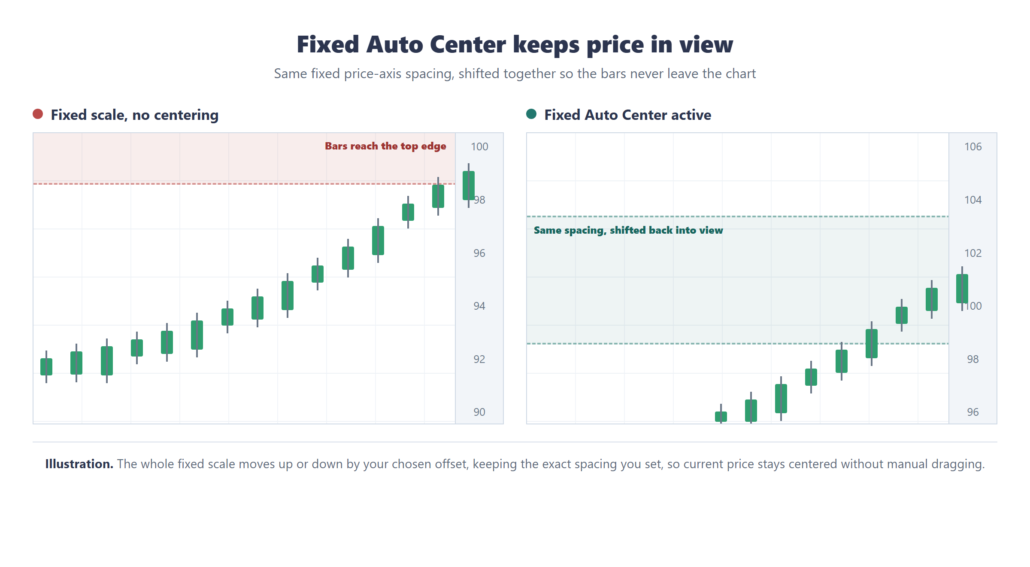
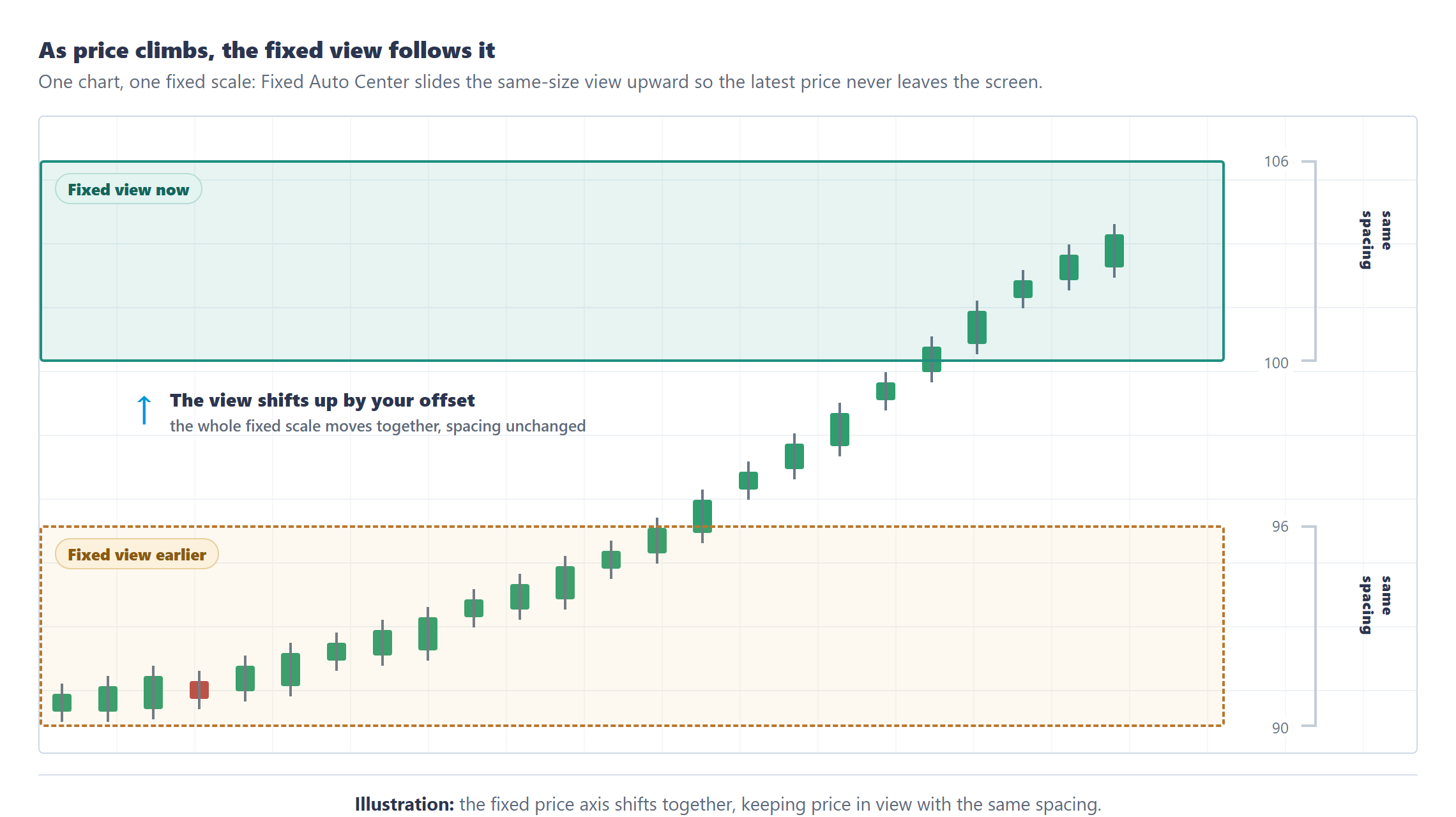
NinjaTrader 8 Fixed Auto Center is a small utility for exactly that moment. As price approaches either edge of the fixed view, it shifts the complete range up or down while keeping the same spacing you set.
Keep the scale you chose
NinjaTrader 8 Fixed Auto Center runs only while the chart uses Fixed range mode. When the latest price reaches the near-edge band you choose, it moves the fixed minimum and maximum together. Automatic-scale charts continue to behave normally.
Tune when it responds
Edge band
Choose how close price gets to either edge before the range shifts.
Offset
Choose how far the complete fixed range moves when it recenters.
Frequency
Choose a realtime response interval, or set it to respond on every render pass.
Manual pause
Hold Left Ctrl while you drag or adjust the scale yourself.
Key features
Maintains the fixed right-axis spacing you set by hand.
Shifts the complete visible range when price nears an edge.
Draws no plots, markers, lines, or chart objects.
Includes a master Fixed – Auto Scale enable setting.
Less dragging, the same fixed scale
Without Fixed Auto Center
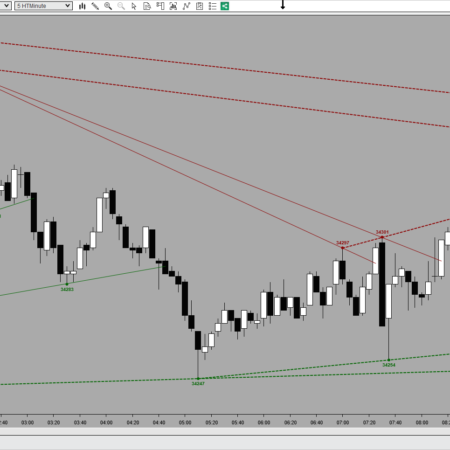
Set the price axis by hand and NinjaTrader drops the chart into fixed scale, so it stops following price.
Watch bars run off the top or bottom of the visible range as price moves.
Drag the price axis back into view again and again through the session.
With Fixed Auto Center
Keep the exact axis spacing you set; the chart stays in fixed scale.
The visible range shifts up or down automatically so current price stays on screen.
Hold Left Ctrl to pause recentering whenever you want to adjust the scale yourself.
Does Fixed Auto Center change my price scale?
It keeps the same spacing you set on the price axis. When price gets close to the edge, it shifts the whole fixed range so the bars stay visible.
Does it work in automatic scale mode?
No. NinjaTrader already handles automatic scaling. Fixed Auto Center is for charts that are in Fixed range mode after the price axis has been adjusted by hand.
Does it draw anything on the chart?
No. It is a lightweight overlay that adjusts the chart scale. It does not add plots, lines, markers, or chart objects.
Can I still move the scale manually?
Yes. Hold Left Ctrl to pause recentering while you manually drag or adjust the scale.
Is this sold separately?
No. Fixed Auto Center is included with the HTech All Access membership and is not sold separately.
Requirements: Windows and NinjaTrader 8.1.2.1 or later.
Coming Soon!
My Account Downloads
After purchase or access, your available HTech downloads are located in your My Account page. Log in with the same account used for the purchase, then open the Downloads tab in My Account.
Installer Passwords
Most individual HTech products are delivered as password-protected self-installing files. The required installer password is included in your order email. If your order includes multiple products, that email may include multiple product passwords.
Please keep your order email in a safe place for future updates, reinstalls, or computer changes.
Machine ID Registration
All HTech NinjaTrader products require Machine ID registration before they can be used, including free products. Log in to My Account and use the NT8 Registration menu item to register your NinjaTrader Machine ID before starting NinjaTrader with the product installed.
Email Registration
The first time you run an HTech NinjaTrader product, you may be asked to enter your email address. Use the same email address registered on your HTech website account. This is normally a one-time step and should not be required again for regular product updates.
Installation Steps
Close NinjaTrader before installing or updating HTech products. Download your product installer, run the downloaded file, follow the installation prompts, and enter the installer password from your order email when prompted.
After installation, start NinjaTrader. If a Trusted Source message appears, accept it. After accepting the Trusted Source message, restart NinjaTrader once more.
Updates and Reinstalls
Do not uninstall previous versions before updating. HTech installers are designed to install over the existing version. After installing the update, open NinjaTrader and the product will be updated.
Individual product purchases include one year of free updates from the date of purchase. During the active update period, available updates can be downloaded from your My Account page.
All Access
All Access uses a separate installer and access model. Eligible HTech NinjaTrader tools are available while the All Access membership is active. If you already own individual HTech products, those separate purchases remain available under their own license terms. When All Access expires, All Access-only products expire and downloads/access end unless a new membership is purchased.
TradeStation
TradeStation products are discontinued and are no longer available for new purchases. Existing customers may continue using downloads they already purchased or licensed when available, but future updates are not planned and support may be limited.
Help
If you have trouble finding your download, locating your installer password, registering your Machine ID, or installing a product, please contact HTech support.
Individual Products
Individual HTech product purchases include a non-expiring license for the purchased product and one year of free updates from the date of purchase. After the update period ends, the product does not expire. You may continue using the version you already own, but future updates are not included unless a new update period, upgrade, or replacement license is purchased.
All Access
All Access is an annual access membership for eligible HTech NinjaTrader tools. It does not auto-renew and does not automatically bill again. When an All Access membership expires, All Access-only products expire unless you choose to purchase a new membership. Any individual products you purchased separately remain available under their own license terms.
Registration
HTech products require registration before they can be used, including free products. Registration may require your NinjaTrader Machine ID or other licensing information depending on the product. Please review the instructions provided after purchase or access for download, installation, and registration details.
License Use
Licenses are for the original purchaser only and may not be shared, transferred, resold, distributed, or used by multiple customers.
Refunds
HTech products are digital software products. Once a product has been purchased, downloaded, licensed, or accessed, the sale is final and non-refundable.
Support
Support is available through the HTech Discord support channel, Microsoft Teams when available, and direct support contact when needed. HTech makes a reasonable effort to respond within one business day, but support may be limited for third-party platform issues, computer setup, brokerage connections, discontinued products, or platform changes outside HTech’s control.
TradeStation
TradeStation products are discontinued and are no longer available for new purchases. Existing customers may continue using what they already purchased or licensed, but future updates are not planned and support may be limited.
Have an idea that would make this tool better? Post it here, every idea is welcome!
Vote for the ideas you would like built: click the ▲ box (click again to remove your vote).
Visit the Customer Feature Requests page to see and vote on requests for every product.



Reviews (login required to post)
Trading with this tool? Share your experience, every review helps fellow traders!
Visit the Customer Reviews page to read reviews for every product.
There are no reviews yet.