VWAP Plus | Support – Resistance | Trading | Technical Analysis | NinjaTrader 7 | Indicator
Plots Today’s:
- Volume Weighted Average Price (VWAP)
- 3 Unique Upper and Lower Standard Deviations of VWAP
Plots Yesterday’s:
- Volume Weighted Average Price (VWAP1)
- 1st 2 Upper and Lower Standard Deviations of Yesterday’s VWAP
- Missed/Naked Yesterday’s VWAP1’s
Also Plots:
- 2 Day Prior Volume Weighted Average Price (VWAP2)
- 3 Day Prior Volume Weighted Average Price (VWAP3)
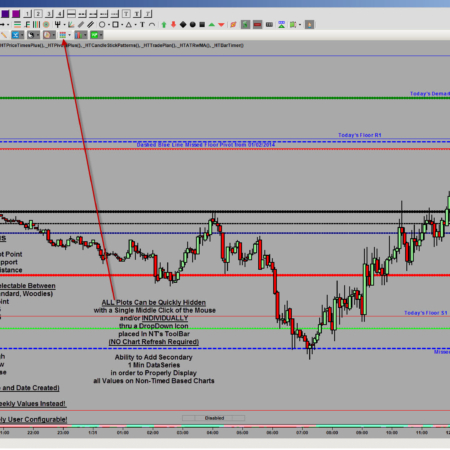
ALL Plots Can be Quickly Hidden (INDIVIDUALLY and/or Altogether)
With a Single Middle Click of the Mouse Thru a DropDown Icon That is Placed in NT’s ToolBar
(NO Chart Refresh Required!)
Accurately Display The Exact Same Values On ANY Chart Type!
with the Ability to Add a Secondary 1 Min DataSeries
– ALL Plot Colors and Styles are Completely User Configurable!
– Can Also Be Used to Plot ALL Above Weekly Values Instead!
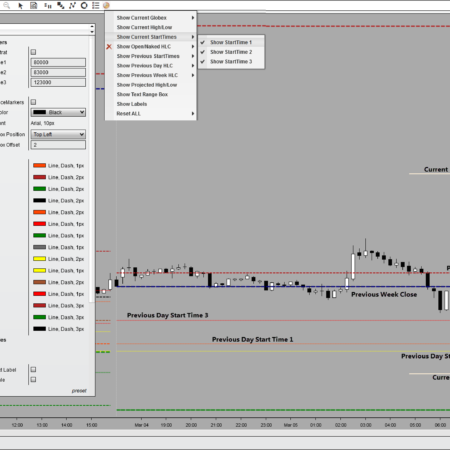
ToolBar DropDown Icon for Easy User Selectable Options and Adjustments Without Chart Refresh.
Please Click on Video Tab to Watch a Recorded Product Demonstration!
Individual Products
Individual HTech product purchases include a non-expiring license for the purchased product and one year of free updates from the date of purchase. After the update period ends, the product does not expire. You may continue using the version you already own, but future updates are not included unless a new update period, upgrade, or replacement license is purchased.
All Access
All Access is an annual access membership for eligible HTech NinjaTrader tools. It does not auto-renew and does not automatically bill again. When an All Access membership expires, All Access-only products expire unless you choose to purchase a new membership. Any individual products you purchased separately remain available under their own license terms.
Registration
HTech products require registration before they can be used, including free products. Registration may require your NinjaTrader Machine ID or other licensing information depending on the product. Please review the instructions provided after purchase or access for download, installation, and registration details.
License Use
Licenses are for the original purchaser only and may not be shared, transferred, resold, distributed, or used by multiple customers.
Refunds
HTech products are digital software products. Once a product has been purchased, downloaded, licensed, or accessed, the sale is final and non-refundable.
Support
Support is available through the HTech Discord support channel, Microsoft Teams when available, and direct support contact when needed. HTech makes a reasonable effort to respond within one business day, but support may be limited for third-party platform issues, computer setup, brokerage connections, discontinued products, or platform changes outside HTech’s control.
TradeStation
TradeStation products are discontinued and are no longer available for new purchases. Existing customers may continue using what they already purchased or licensed, but future updates are not planned and support may be limited.
Full Terms
By purchasing, downloading, installing, accessing, or using this product, you agree to HTech’s current
Terms and Conditions, Risk Disclosure, Disclaimer, Privacy Policy, and product licensing requirements..
Frequently Asked Support Questions
Feature Requests (login required)
Have an idea that would make this tool better? Post it here, every idea is welcome!
Vote for the ideas you would like built: click the ▲ box (click again to remove your vote).
Visit the Customer Feature Requests page to see and vote on requests for every product.
Log in to post a feature request or vote.
My Account Downloads
After purchase or access, your available HTech downloads are located in your My Account page. Log in with the same account used for the purchase, then open the Downloads tab in My Account.
Installer Passwords
Most individual HTech products are delivered as password-protected self-installing files. The required installer password is included in your order email. If your order includes multiple products, that email may include multiple product passwords.
Please keep your order email in a safe place for future updates, reinstalls, or computer changes.
Machine ID Registration
All HTech NinjaTrader products require Machine ID registration before they can be used, including free products. Log in to My Account and use the NT8 Registration menu item to register your NinjaTrader Machine ID before starting NinjaTrader with the product installed.
Email Registration
The first time you run an HTech NinjaTrader product, you may be asked to enter your email address. Use the same email address registered on your HTech website account. This is normally a one-time step and should not be required again for regular product updates.
Installation Steps
Close NinjaTrader before installing or updating HTech products. Download your product installer, run the downloaded file, follow the installation prompts, and enter the installer password from your order email when prompted.
After installation, start NinjaTrader. If a Trusted Source message appears, accept it. After accepting the Trusted Source message, restart NinjaTrader once more.
Updates and Reinstalls
Do not uninstall previous versions before updating. HTech installers are designed to install over the existing version. After installing the update, open NinjaTrader and the product will be updated.
Individual product purchases include one year of free updates from the date of purchase. During the active update period, available updates can be downloaded from your My Account page.
All Access
All Access uses a separate installer and access model. Eligible HTech NinjaTrader tools are available while the All Access membership is active. If you already own individual HTech products, those separate purchases remain available under their own license terms. When All Access expires, All Access-only products expire and downloads/access end unless a new membership is purchased.
TradeStation
TradeStation products are discontinued and are no longer available for new purchases. Existing customers may continue using downloads they already purchased or licensed when available, but future updates are not planned and support may be limited.
Help
If you have trouble finding your download, locating your installer password, registering your Machine ID, or installing a product, please contact HTech support.




Scottie (verified owner) –
AMAZING INDICATOR! Keeps me on the correct side of the trade! I have another VWAP indicator for NT8, yours makes the other look like a piece of junk!
THANKS AGAIN!
Bogdan (verified owner) –
Your Vwap Plus indicator has made the difference for me. My opinion is definitely the best VWAP I saw out there (and trust me, I have tried it all of them). You explain help me to try to build myself a strategy with Vwap Plus indicator and I can say work pretty good on BloodHound too. Thank you!
Javier (verified owner) –
Best VWAP indicator in the market, I´d say. The combination of the past VWAPs+SDs makes this indicator unique. If you have problems installing the indicator, the technical service is always ready to help. Great service!
Scottie (verified owner) –
Best “indicator,”I have ever purchased. Helps me make more money, Should me renamed to the money maker! Thank you Edge!
randyjb (verified owner) –
Simply the very best Vwap indicator to be had anywhere and one of the best all around indicators I’ve ever gotten my hands on. Easy to setup. Can adjust plotting features from a button drop down menu right on the chart. Provides the seldom found prior day’s Vwap levels. Service is available right on Skype. I could say more but I am a trader, not a professional reviewer, so there ya have it.
You may have to trade alongside the pros but you don’t have to do it in the blind.
Frank (verified owner) –
Been using your VWAP Plus for 3 months now and it’s the best VWAP indicator available. Can’t imagine trading without it!!
Luis (verified owner) –
Luis (verified owner) – July , 2016
Edge : Thanks for providing the awesome support. Thanks for taking the effort to customized the swing indicator to reflect time. It is exactly the feature I’ve been searching for on NT swing indicator trading platform. You solved it for me. Edge thanks for the great internal support experience.
Yevgeniy (verified owner) –
I have used different vwap indicators before. This vwap plus indicator is the best for me so far. Very easy to adjust for your own needs. Also, it is remarkably fast support through skype.
Would definitely recommend this indicator.
traderalex81 (verified owner) –
VWAP is an awesome indicator and Htech really did awesome job..Very impressed with this indicator!
Ben (verified owner) –
I wish I could upload pics that truly express how spot on this HTVwapPlus is. All I can say is I CANNOT trade without it. I also want to add that after running into trouble (my fault) after purchasing an additional indicator (HTSupplyDemandMTF) I had to reach out to Steve. Long story short, I called Steve and he recognized the issue. Just having the ability to directly call and get a solution shows the level of compassion Steve has for both programming and making sure his customers know they are appreciated. Thanks ‘Edge’!
kamaleshdesai (verified owner) –
Steve ; )
I am very much impressed with VWAP Plus indicator as I am a big fan of Vwap and it was very easy to install and update to the new versions .
Steve you are awesome and very helpful !
Thanks a lot Steve.
Forrest (verified owner) –
Edge: I am also impressed with the VWAP Plus indicator – It was very easy to install and after watching the video I can understand why traders would be interested in this indicator. After watching the video and using the indicator for a few days I could see the consolidation and turning points in the market usually at the VWAP, 1st deviation and so on, this was a real plus for me. Also as Edge states if an overview is needed (by Skype or phone) the service is there to get your indicator installed and set-up as needed. Thanks again Edge!
casejack (verified owner) –
Steve: Am very impressed with vwap plus. I had not worked with it very much til after I watched the video again. It truly is very powerful in assisting in market analysis. Thanks for making vwap plus available to traders.